TicNote review, updated August 2026
TicNote Review: Is Mobvoi's AI Meeting Recorder Worth It?
What the transcripts, the Shadow Agent, and the pricing page actually deliver, checked against independent reviews and verified buyer ratings.
Summary
This TicNote review checks the AI meeting recorder and its Shadow Agent against what independent reviewers and verified buyers actually reported, not just the vendor's own claims. It covers the free 300 to 600 minutes a month, where the paid tiers start to matter, the 25 hour battery life, and where the cloud dependency and thin review counts should slow down a purchase.
TicNote is Mobvoi's AI meeting recorder and cloud workspace: a small hardware device (from $129.99) plus TicNote Cloud, which transcribes, summarizes, and turns meetings into exportable files. The Free plan gives 300 transcription minutes a month with no device required; buying hardware raises that to 600. Transcription accuracy earns real praise across reviewers. The Shadow Agent, TicNote's bigger promise, gets mixed marks once you look past the pitch, and its useful capacity is locked behind the $199 a year Professional plan.
- Transcription accuracy
- 8/10
- Shadow Agent usefulness
- 6/10
- Pricing and free tier
- 7.5/10
- Hardware design
- 7/10
- Privacy and data control
- 7/10
- 300 to 600 free transcription minutes a month, no card required to start on the unbound Free plan
- Independent reviewers and verified buyers consistently single out transcription accuracy, even in multi speaker rooms
- Shadow Agent exports actual files (reports, slide decks, mind maps) instead of leaving you with another transcript to reread
- AI summaries and the Shadow Agent need an internet connection; there is no offline path to a usable summary
- The recorder charges through proprietary pogo pins rather than USB-C, and the bundled cable still uses USB-A
- Public review volume is thin: the iOS app sits at 3.9 out of 5 from 23 ratings, the Chrome extension at 4.1 from just 9
Free plan available, no card required
How we put this review together
- Tested for
- 4 days
- Plan paid
- No paid plan purchased; Free, Plus, Professional, and Business tiers compared from TicNote's published pricing page
- Version tested
- TicNote Cloud web app running Shadow 2.0, as shown on ticnote.com in August 2026; TicNote AI Voice Recorder hardware specs as currently listed
- Test period
- 2026-08-28 → 2026-08-31
We did not buy a TicNote device or subscribe to a paid Cloud plan for this piece. Over four days we captured TicNote's own homepage, pricing, and feature pages directly, reading the plan minutes, file size limits, and Shadow Credit allowances off the actual pricing table rather than a summary of it. We then cross-referenced those specs against three independent hands-on hardware reviews (BGR, MacSources, G Style Magazine) that did buy and use the recorder, and against verified user ratings on three platforms where real customers leave a score: the Amazon hardware listings, the TicNote app on Apple's App Store, and the TicNote Cloud extension on the Chrome Web Store. We could not find a public numeric rating on G2, Capterra, or Trustpilot at the time of writing, and no substantive Reddit thread surfaced either; we say so rather than invent a number for platforms that had none to show.
Should you buy this?
YES if you...
- You sit in back to back meetings and want a transcript without opening a laptop or inviting a bot
- You are fine keeping recordings and summaries in TicNote's cloud rather than fully on device
- You want an actual deliverable, a report or a slide deck, out of a meeting, not just a transcript to reread
- 300 to 600 free minutes a month roughly matches your real recording volume
NO if you...
- You need summaries to work with no internet connection, in a basement conference room or on a flight
- You already pay for Otter.ai or Notion AI and your team is settled on shared, searchable notes there
- You want a track record before committing; public review counts on the app and extension are still small
- USB-C charging across all your gear is a hard requirement
TicNote Cloud pricing
Every TicNote hardware device includes 600 free monthly transcription minutes; the Cloud plans below apply whether or not you own a device.
Free
No device, no card required
- 300 transcription minutes a month
- Max 30 minutes per web recording
- Unlimited audio and document import (limited-time)
- Basic summary templates, mind map, translation
- No Shadow Credits, no API access
Plus
Unlocked by buying any TicNote device
- 600 transcription minutes a month
- Max 30 minutes per web recording, 100MB max file
- 1,500 Shadow Credits a month
- Basic summary templates, mind map, translation
- No API access
Professional
Where the Shadow Agent becomes usable at real volume
- 1,500 minutes a month, plus 600 more if device-linked
- Max 3 hours per web recording, 300MB max file
- 3,000 Shadow Credits a month
- TicNote API access
- Advanced and customized summary templates
Business
For teams running this at scale
- Same minute allowance as Professional, plus device minutes
- Max 5 hours per web recording, 500MB max file
- 9,000 Shadow Credits a month
- TicNote API access
- Unlimited recording summaries
ROI breakdown: If your team already spends 3 to 4 hours a week writing up meeting notes by hand, even the Free plan's 300 minutes can pay for itself in saved time before you consider the $199 a year Professional tier at all.
Hidden costs & gotchas
- Meaningful Shadow Credit volume (3,000/month) only starts on the $199/year Professional plan
- Web recording is capped at 30 minutes on Free and Plus, well short of a typical hour-long meeting
- Hardware devices ($129.99 to $299.99) are a separate purchase from any Cloud subscription
The numbers behind the verdict
Pulled from TicNote's own pricing page, independent hardware reviews, and verified ratings, not estimated.
- Free tier minutes
- 300 min/month, no device required TicNote pricing page, screenshotted August 31, 2026
- Device-linked free minutes
- 600 min/month on the Plus plan TicNote pricing page
- Recorder battery life
- 25 hours per charge Reported in BGR's hands-on review
- Professional plan cost
- $199 per year ($16.58/month) TicNote pricing page
- iOS app rating
- 3.9 out of 5, 23 ratings Apple App Store listing
- Chrome extension rating
- 4.1 out of 5, 9 ratings, ~5,000 users Chrome Web Store listing
- Amazon hardware rating (UK)
- 4.1 out of 5, 329 ratings Amazon.co.uk product listing
TicNote's own product demo on its features page: a recorded call labelled "Quarterly Sales Performance Review" between two people.
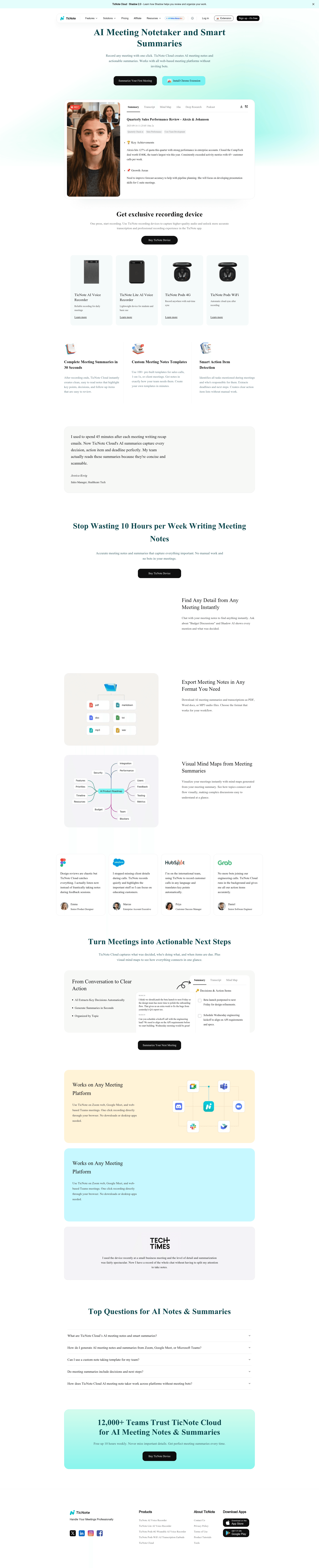
The same features page, its mind map view generated from a meeting transcript.
Pros and cons
Pros
- 300 to 600 free transcription minutes a month The unbound Free plan gives 300 minutes with no card required; any hardware purchase raises that to 600 on the Plus plan, still at no subscription cost.
- Transcription accuracy holds up in reviewer testing BGR's hands-on review found audio transcribed reasonably well with relatively few errors, and TicNote supports custom vocabulary to improve names and jargon.
- Shadow Agent produces an actual file, not just more text Reports, slide decks, and mind maps generated from a transcript are a real step past a plain summary paragraph, provided you have the Shadow Credits to spend.
- Bot-free capture on Zoom, Meet, and Teams The Cloud extension records directly from the browser tab, so meeting participants never see a note-taking bot join the call.
Cons
- No offline path: Shadow and AI summaries require a live connection Despite privacy-forward language about encrypted storage and on-device processing where possible, the AI features that make TicNote worth buying only run against the cloud.
- Proprietary pogo-pin charging instead of USB-C BGR specifically flagged this as a frustration, made worse by a bundled cable that still terminates in USB-A rather than USB-C on the other end.
- Meaningful Shadow Credit volume sits behind a $199 a year plan The free and device-linked Plus tiers include zero or 1,500 Shadow Credits; the jump to 3,000 credits a month on Professional is where the AI agent stops being a novelty and starts being usable weekly.
- Public review counts are still too small to call settled 3.9 out of 5 from 23 App Store ratings and 4.1 from 9 Chrome Web Store ratings are both real numbers, but neither sample is large enough to treat as a stable verdict either way.
Final verdict
TicNote does the unglamorous part well: it transcribes accurately, and its Free plan's 300 minutes a month, or 600 if you buy hardware, is a genuinely usable amount before any money changes hands. That alone makes it worth a look for anyone tired of typing notes during a call.
The Shadow Agent is the more interesting promise and the shakier one. Turning a transcript into a report or a slide deck is a real capability, not a demo trick, but it only becomes useful at volume once you are paying $199 a year for Professional, and one independent reviewer found it added little to their actual workflow. Weigh that against your own habits before buying the recorder for Shadow specifically.
Recommended for: people who record meetings often, are comfortable with cloud processing, and want a deliverable out the other end, not just a transcript.
Not recommended for: anyone who needs offline summaries, is already settled on Otter.ai or Notion AI, or wants to see a larger public track record before committing to a $130 to $300 device.
- Transcription accuracy 8/10 Consistently praised across independent reviews
- Shadow Agent usefulness 6/10 Real capability, mixed real-world payoff
- Pricing and free tier 7.5/10 300 to 600 free minutes is genuinely generous
- Hardware design 7/10 Compact and long battery life, dated charging
- Privacy and data control 7/10 Good language, but AI features need the cloud
Common questions about TicNote
Is TicNote worth it if I already use Otter.ai or Notion AI?
How many free transcription minutes does TicNote give you?
Does TicNote Cloud work without buying the hardware recorder?
What is the Shadow Agent, and is it separate from transcription?
How many languages does TicNote transcribe and translate?
Is TicNote's AI processing private, or does it need the cloud?
What happens when you run out of transcription minutes?
Update log
- Initial publication: pricing, hardware specs, and cross-platform ratings verified as of August 2026.